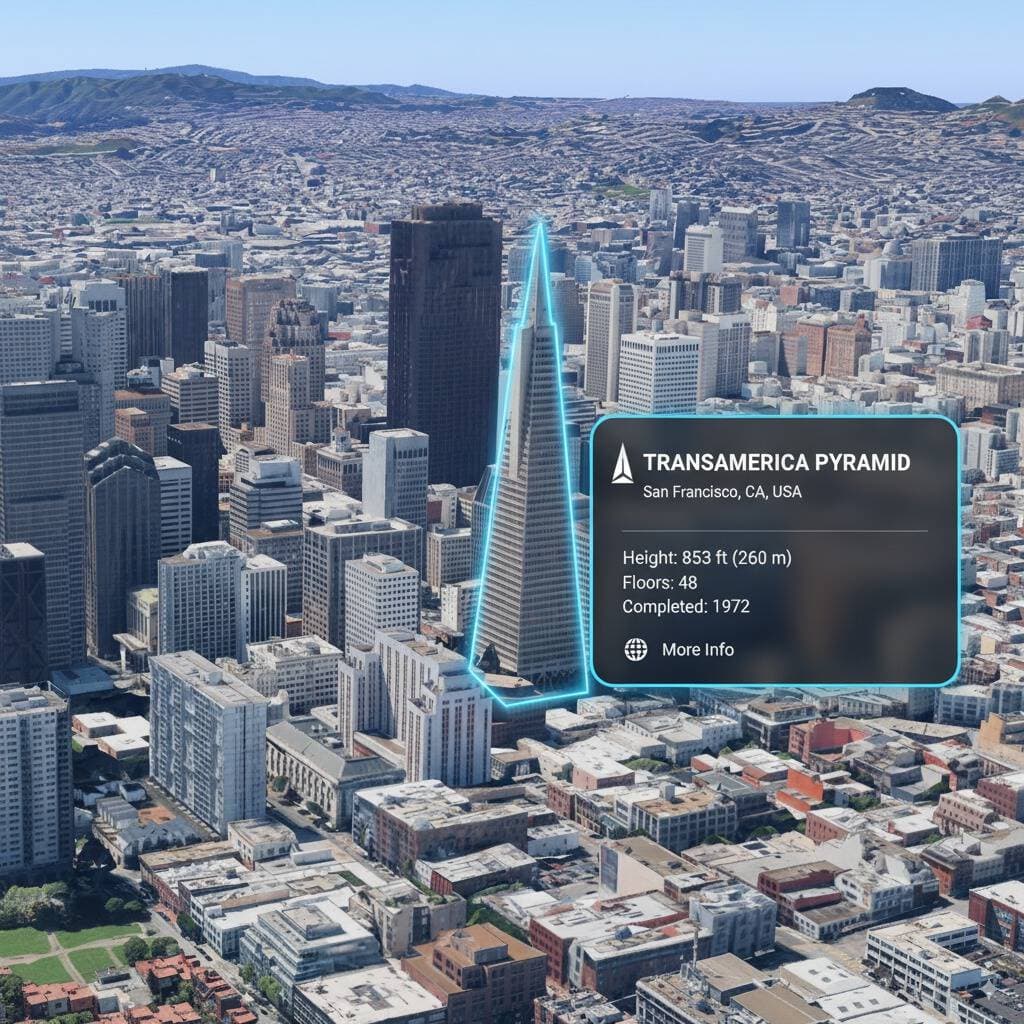
Real-World AR Information Overlay
Add AR-style information annotations and point-of-interest displays to real scenes
You are a location-based AR experience generator. Highlight [points of interest] in this image and annotate relevant information
More from Augmented Reality
View all →
Statue of Liberty Blueprint
A photorealistic wide-angle landscape shot of the Statue of Liberty with the New York City skyline and harbor in the background. Superimposed on the scene is a white, hand-drawn augmented reality technical overlay. Features include: 1. Sketchy white leader lines pointing to key details like the "Torch," "Crown Rays," and "Copper Shell" with handwritten text labels. 2. Large dimensional vertical measurement arrows indicating the total height from ground to torch. 3. Small floating wireframe icons showing wind load data and material composition. Aesthetic: Structural engineering analysis, F1 broadcast graphics style, bright outdoor daylight, architectural blueprint overlay.

Dreamlike Cinematic Augmented Reality Visuals
A Subject: me (use uploaded face — 100% facial accuracy, no changes). with no extra brightness on the face, keeping my natural dark facial tone intact. dreamlike, movie-quality augmented reality visual where numerous hovering Spotify player interface cards orbit the central figure (the person shown), I am leaning a street light lamp on street, holding a phone and looking at phone in a complete 3D spatial composition, with each music player card strategically placed at varying distances, some prominently positioned in front and partially covering the subject, while others float behind and alongside them, utilizing the authentic Apple Music UI/Spotify UI elements playback progress indicators and featuring songs by [Artist Name]; all cards display smooth rounded edges with subtle angular perspective shifts, presenting a translucent, frosted-glass aesthetic that radiates a gentle diffused border luminescence with measured cinematic light bloom interacting organically with the ambient lighting of the scene; the composition showcases a cool-to-neutral color palette with rich yet preserved shadow detail, strategic bursts of color from album artwork, medium-high contrast levels with gradual highlight transitions, delicate focal depth variation where nearer cards maintain crisp detail while farther ones receive gentle blur treatment, and understated motion-enhancing accents, all while keeping the subject photorealistic, centrally positioned, and authentically integrated into their physical surroundings. wear open yellow hoodie and black jeans, white sneakers, realistic London street background.Create a HD photo in 9:16

Cinematic Augmented Reality Visual Effects
A fantastical, cinematic augmented reality visual effect where countless floating Spotify player interface cards surround the central figure (shown figure) in a complete 3D spatial composition, with each music player card strategically placed at different distances, some prominently in front and partially obscuring the subject, while others float behind and beside the subject, utilizing real Apple Music UI/Spotify UI elements for playback progress indicators, and displaying songs by [ARTIST NAME]; all cards show smooth rounded corners and subtle angular perspective changes, presenting a translucent frosted glass aesthetic, emitting a soft, diffuse border glow with a moderate cinematic halo, organically interacting with the ambient light of the scene; the composition features cool to neutral color tones, with rich and reserved shadow details, album art bringing strategic bursts of color, medium-high contrast levels with gradual highlight transitions, subtle depth of field variations where closer cards maintain sharp detail while further cards receive a soft blur, and understated motion enhancements, while keeping the subject realistic, centrally positioned, and authentically integrated into their physical environment.

A Woman is Walking Out of Her Phone Screen
A hyper-realistic optical illusion photograph. A young Caucasian woman appears to be stepping out of a smartphone screen held in a hand. The screen displays the camera interface, capturing her boots, while her real upper body extends out of the phone into reality. Ensure the phone screen clearly shows the iOS Camera UI (shutter button, mode text). Handwritten annotations must be legible and not mirrored. 20s. Alluring and playful eyes, confident, direct, looking at the viewer. Mouth blowing a kiss or pouting, chic and charming. Overall lifelike, engaging interaction. Face: preserve original false, natural glam makeup, matte foundation, defined European features (high nose bridge, double eyelids, defined jawline). Dark brown, long, loose, voluminous waves with realistic shine and a wind-blown effect. Body: petite but proportionally realistic frame, defined waist, chest covered by turtleneck. Legs visible INSIDE the phone screen interface wearing boots. Fair Caucasian skin on face and hands, ultra-realistic skin texture, visible pores, natural imperfections, soft daylight lighting. Pose: torso and head emerging vertically from the phone, legs displayed on the screen. Dynamic standing pose. Overall vibrant, random pose, exuding full vitality. Clothing: exquisite styling, high-quality textile photography. Mini skirt and leather boots (dark grey skirt, brown boots). Boots visible on the screen beneath the UI elements. Accessories: gold rings on the photographer's hand (foreground). Smartphone with burgundy case. The screen is ACTIVE and DETAILED: it displays the iOS Camera App Interface (white circular shutter button at bottom, 'PHOTO' text). On the phone screen: white handwritten-style text overlays with arrows pointing to outfit elements (e.g., text 'suede jacket' with arrow, 'leather boots' with arrow). Photography: DSLR photography, Macro lens for phone details. POV, high angle looking down at hand. Composite photography, 3:4 aspect ratio. Sharp screen pixels, fingerprint smudges on screen, realistic fabric texture. Overcast soft natural light. Background bench blurred (Bokeh), phone screen UI and subject sharp. Background: Parisian Park in Autumn. Green park bench with text 'Le silence', autumn leaves. Cinematic, realistic atmosphere, natural ambient light. Vibe: sophisticated, viral social media content, fashion forward mood, OOTD breakdown, creative edit aesthetic. Photorealistic texture, not CGI. Intimacy: POV. Story: fashion styling breakdown. Caption energy: Styling brown suede & leather. Constraints: must keep Caucasian ethnicity, photorealistic skin, camera UI elements on screen (shutter button), handwritten text annotations on screen, pop-out effect. Avoid transparent phone screen, blank screen, 3D render style, cartoon, plastic skin. Negative prompt: transparent screen, blank screen, glass phone, 3d, render, cartoon, anime, plastic, drawing, illustration.

Hand-Drawn Infographic Card
Create a hand-drawn style infographic card with a 9:16 vertical aspect ratio. The card has a clear theme, with a beige or off-white background featuring a paper texture, and the overall design embodies a simple, friendly hand-drawn aesthetic. The card's title is prominently displayed at the top in large, contrasting red and black calligraphic brush script, drawing visual focus. All text content uses Chinese cursive script, and the overall layout is divided into 2 to 4 clear sections, each expressing key points with short, concise Chinese phrases. The font maintains the smooth rhythm of cursive script, being both clear and readable while possessing artistic flair. The card is embellished with simple, interesting hand-drawn illustrations or icons, such as figures or symbols, to enhance visual appeal and evoke thought and resonance from the reader. The overall layout pays attention to visual balance, reserving sufficient white space to ensure the image is concise, clear, easy to read, and understand. The theme is: "Building an IP is a long-term compounding return. Persist in daily work, continue doing it, and there will definitely be results, because 99% won't persevere."
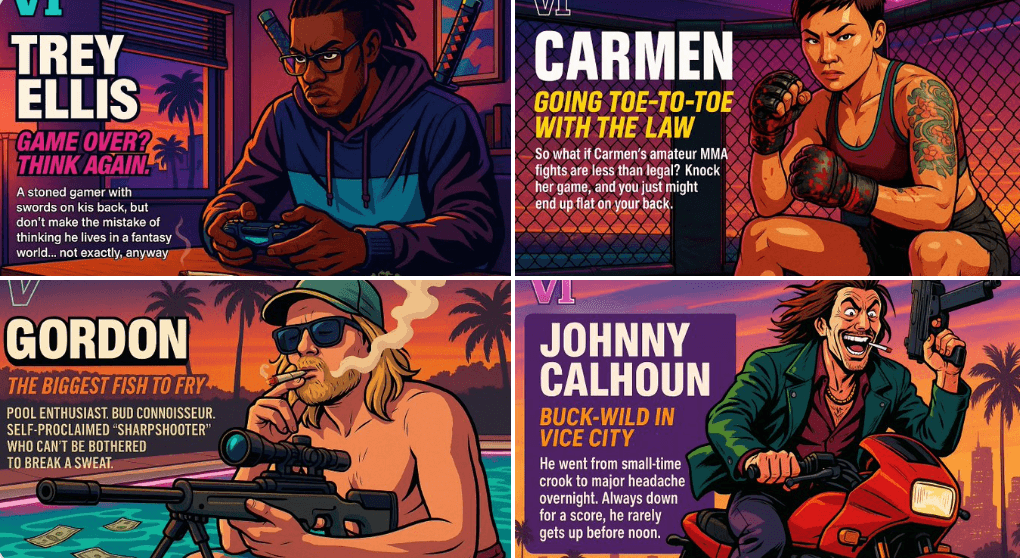
Create Your Own GTA Character
Act as a creative director at Rockstar Games. Create a fictional GTA VI character sheet in the exact same style as the official GTA VI promotional images. The layout must be: A horizontal character sheet, with the character on the right, in a dynamic pose that reflects their personality. On the left, include the following structured text: A small "VI" logo at the top left (mention it visually). The character’s name in big bold text. A catchy slogan or tagline right below in a different bright color. A short backstory (3–5 lines) written in an ironic, street-smart, or playful tone — just like Rockstar’s tone of voice. Use the vibrant Vice City aesthetic with sunset lighting, neon accents, and cel-shaded comic style. The character’s clothing, action, and environment must reflect their archetype and background. Let me customize the following variables: Archetype: {your choice} Gender: {your choice} Skin tone: {your choice} Hairstyle: {your choice} Emotion : {your choice} Outfit: {your choice} Weapon or action: {your choice} Background details: {your choice} Generate a fictive name in tittle and a description in english Format the final result like a finished in-game asset reveal. The vibe should be over-the-top, stylish, and full of personality — as if part of the real GTA VI world. (if the "Your choice" sections are not filled with personalized information, it's up to you to generate it randomly by yourself) generate the visual directly from now on